📌 Weekly Structure (applies every week)
- Content Release: Mondays @ 11 AM(Tues @ 11 AM if holiday week). Week 1 opens on Tuesday, January 20th due to no class at our university
- Deadlines: All assignments due Mon @ noon (or Tue when no Monday class)
- ZOOM : Optional. Monday review + critique (recorded). If no Monday class → prerecorded review + Wed @ noon live session.
- Critiques:
- Regular weeks: Mon @ noon → Wed @ noon
- No Monday class: Tue @ noon → Thu @ noon
- Use discussion board if not in ZOOM
- Remote Office Hours: Wednesdays, 11AM–1PM → Schedule Here
Week 2 Links & Notes
Live Sessions This Week:
👉 Join Live: Mon 1.26 @ NOON (week 2 review)→ 🎥 [Join Here]
Will be recorded for those unable to attend live.
🎥 Watch: Mon 11.26 Weekly Review Recording → [Watch Here]
Looking Ahead (Week 3)
Next live (recorded) session: Mon Feb 2nd @ noon (only live session in Week 3)
This week’s deadlines:
Monday, Feb 2nd @ noon
- Practice setting up your warmup 1 in a text editor, and warmup 2 and exercise 1 using the site setup in DW. Watch the Zoom Recording above or the videos below for more guidance. You have the rest of the week to complete warmups 1–2 and exercise 1.
- Complete Exercise – Part 1 (you will turn this in with part 2 – we will begin part 2 next week)
- Complete and Submit Warmup 1 via D2L Assignments
- Complete and Submit Warmup 2 via D2L Assignments
- Discord Prompt #1
- Read chapters 1–4 (structure, text, list, links) in Duckett’s HTML & CSS
Due Monday 2.9
Blog 1 – post on D2L Discussion Board
Due Wednesday 2.11:
2 Peer Comments on Blog 1 Discussion Board (48h window for commenting)
Last week, we introduced Blog #1 and Ep1
Next week, we will move on to Ep2, W3
Weekly Content
Week 2 (though not required, it is recommended you move through in sequence. All 15 need to be completed by next Monday @noon):
SECTION I – HTML and CSS
- Watch: video – Week 2 Weekly Review (above).
- Lecture: HTML Text, Structure, and Images (27m – videos below)
- Review HTML Resources
- Lecture: Links (31m – videos below)
- Review Links Resources
- Read Chapters 1–4 in Duckett’s HTML & CSS
SECTION II – Warmup 1 + Warmup 2 + Exercise 1 + Prompt 1
- Due Mon 2.2@noon: Warmup #1: First Webpage (9m video)
- Due Mon 2.2@noon: Warmup #2: HTML Recipe (23m videos)
- Complete by Mon 2.2: Exercise – Part 1: HTML Menu (do not submit yet)
- Due Mon 2.2@noon: Discord Prompt 1
- Due Mon 2.9@noon: Continue Blog 1 posted last week
SECTION III – Dreamweaver Intro
- Intro to Dreamweaver
- Review Dreamweaver Resources
- Watch video demos, as needed (listed under Warmup 2)
SECTION I – Web Concepts
In this section, you will find our lectures and resources for HTML continued and our introduction to CSS.
- Bold Tag | w3schools
- Duckett’s Code Samples: Lists
- Duckett’s Code Samples: Text
- HTML5 Skeleton
- Duckett’s Code Samples: Images
- Duckett’s Code Samples: Links
- Links | HTML Dog
- HTML Links | w3schools.com
- target = blank
- One page with multiple stylesheets
SECTION II – assignments
7. Warmup 1 (5pts)
Create your first warmup in TextEdit (Mac) or Notepad (PC) and upload to the Dreamweaver FTP (video below). Watch the video while I walk you through the assignment.
01. Open a text editor.
02. Create a new document.
03. Go to format > Make Plain Text
04. Type the code shown in the video.
05. Save + name your file “lastname_warmup1.html” to a folder on your desktop or flash drive.
06. In your browser, open file (drag and drop to browser window, OR go to file>open from browser).
8. Warmup 2 (5pts)
We will start together in video and you will finish independently.
Create a new .html document—named "lastname_warmup2.html—and save to a folder on your local drive called "warmup2".

Find a simple recipe online to duplicate.
<h1>: name of the recipe

<p> description about recipe

<h2>: titles for ingredients and steps

<ul> list of ingredients

<ol> list of steps

<a> link to original recipe

include bold and italics styling

include a horizontal rule between the ingredients and the steps

change one of the ingredients using the insert and delete tags

include a personal quote about why you love this recipe

Upload to D2L Assignments Folder.
9. Exercise Part 1 – HTML Menu
10. Discord Prompt #1: Navigating HTML’s Challenges and Triumphs
2pts (reminder: these are not accepted late)
Prompt (1pt): Drop 1 screenshot of your HTML menu (or paste 3–6 lines of your code) and answer:
- What part of your menu layout are you most confident about?
(Ex: headings, sections, lists, link, organization) - What part feels confusing or messy right now?
(Ex: indentation, organizing menu items, deciding between lists vs paragraphs, etc.)
Participation (1pt): Engage with at least one classmate’s post. Respond to one classmate with one helpful suggestion + one question.
(Example: “Try grouping those into one <section>—what do you want users to see first?”)
Offer a supportive comment, share a tip, or ask a question that could deepen both your understandings. This is about building our community as much as it is about learning HTML. Support each other and connect.
SECTION III – Intro to Dw
13. Intro to Dreamweaver
In Dreamweaver, this week includes an introduction to the DW Interface, HTML tags, and turning in work via the DW FTP.
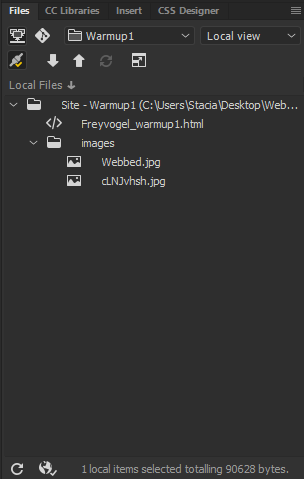
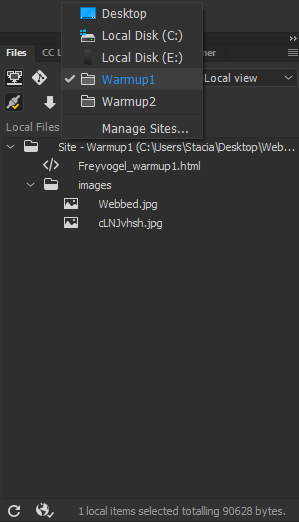
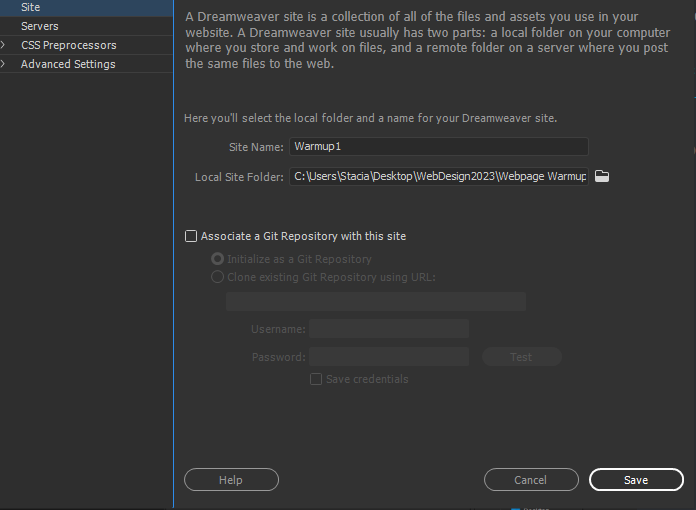
Setting Up E1 in Dreamweaver
- Create a local folder on your hard drive where you can store your websites and exercises from the course. Name it “lastname_web.” When you create any files in Dreamweaver, this is where you will save them.
- In Dreamweaver, create a new site. Name your site Exercise 1. For Local Site Folder, browse for your local folder you created on your hard drive.
- Go to File > New. Create your HTML document. Save it in the local folder you create on your hard drive as “lastname_exercise1.html”.
- Once finished creating your document(s), turn in via D2L Assignments folder.
14. DW Resources
- DW Keyboard Shortcuts | pdf
- DW Defining a Site | video
- Overview of the Dreamweaver Workspace | reading (do not read about CSS Designer…yet)
15. Video Demos
The DW videos were rolled into the Warmup2 videos above to make it easier to follow and ensure you watch in sequence. Watch, as needed, following our in-class demonstrations.
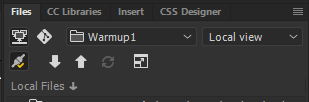
Thank you to Stacia Freyvogel for taking screenshots of the steps for file set up (below).