📌 Weekly Structure (applies every week)
- Content Release: Mondays @ 11 AM(Tues @ 11 AM if holiday week). Week 1 opens on Tuesday, January 20th due to no class at our university
- Deadlines: All assignments due Mon @ noon (or Tue when no Monday class)
- ZOOM : Optional. Monday review + critique (recorded). If no Monday class → prerecorded review + Wed @ noon live session.
- Critiques:
- Regular weeks: Mon @ noon → Wed @ noon
- No Monday class: Tue @ noon → Thu @ noon
- Use discussion board if not in ZOOM
- Remote Office Hours: Wednesdays, 11AM–1PM → Schedule Here
Week 3 Links & Notes
Live Sessions This Week:
👉 Join Live: Mon 2.2 @ NOON (week 3 review)→ 🎥 [Join Here]
Will be recorded for those unable to attend live.
🎥 Watch: Mon 2.2 Weekly Review Recording → [Watch Here]
Looking Ahead (Week 4)
Next live (recorded) session: Mon Feb 9th @ noon (only live session in Week 4)
This week’s deadlines:
Monday, Feb 9th @ noon
- Complete and submit Blog 1 – post on D2L Discussion Board
- Complete and Submit Warmup 3 via the D2L
Due Wednesday 2.11:
2 Peer Comments on Blog 1 Discussion Board (48h window for commenting)
Due the following Monday 2.16 @ noon
- Complete and Submit Exercise Part 2 via D2L
Last week, we completed Warmup 1, Warmup 2, and E1.
Next week, we will finalize Exercise part 2 and move on to Warmup 4.
Weekly Content
Week 3 (All items need to be completed by next Monday @noon—some noted content items were moved to next week due to timing):
SECTION I – CSS + Web Typography
- Lecture: CSS Intro, Text, and Color (1h23m videos)
- Review CSS Resources
- Lecture: CSS Box Model and Webfonts (videos next week)
- Review Box Model and Webfont Resources (videos next week)
- Box Model Game (moved to next week)
- Read Chapter 5, 10, 12+13 (CSS Text and Boxes) in Duckett’s HTML & CSS and pp. 183–186 (links, images, CSS) in Duckett’s HTML & CSS
SECTION II – Blog 1 Comments + Warmup 3 + Exercise part 2 - Due Mon 2.9 + 2.11: Blog #1 (looking ahead: 2 Peer Comments due 2.11)
- Due Mon. 2.9: Warmup #3: CSS Recipe (28m video)
- Due Next Mon. 2.16: Exercise part 2: CSS Typeface Exploration
SECTION III – DW: CSS Panel + Webfonts - CSS Designer Demo (video)
- Watch Demo Video on Webfonts
- Review Webfont Resources
*No Discord Prompt this Week*
SECTION I – Web Concepts
2. CSS Resources
- Figure Caption TryitEditor
- Duckett’s Code Samples: Introducing CSS
- One page with multiple stylesheets
- 3 CSS Methods | w3schools.com
- Applying CSS | HTML Dog
- CSS Properties Reference | w3schools.com
- Types of Selectors:
- Element Selector | w3schools Try-it Editor
- Class Selector | w3schools Try-it Editor
- ID Selector | w3schools Try-it Editor
- Specificity | HTML Dog
- Rules that Govern CSS:
- Color:
- Text:
- Duckett’s Code Samples: Text
- font-family| HTML & CSS Book
- font-size | w3schools Try-it Editor
- font-weight | HTML & CSS Book
- font-style| HTML & CSS Book
- Background Images:
3. CSS Box Model + Webfonts
Note: You can scan this section to see where we are headed, but I’ve moved the lectures to next week so you can focus on beginning the warmup and exercise.
Class7_CSSBoxModel_Webfonts4. Box Model + Webfont Resources
- Duckett’s Code Samples: Boxes
- Interactive Box-Model Demo
- CSS Box Model for Beginner: Unlocking the Magic of CSS
- @font-face | w3schools
SECTION II – assignments
8. Warmup 3 +
10. DW Demo
Disregard logging in to FTP steps, we are using D2L to submit work. I’ve edited all future videos to omit this step.
8. Warmup 3 - Styling Your Recipe with CSS (5pts)

Enhance the HTML document created in Warmup 2 by applying basic CSS styling to improve its visual design and interactivity. This exercise will focus on typography, color schemes, and introducing hover effects.

Goals: Improve readability, clarify hierarchy, make sections feel intentional, use CSS to guide the reader.

Prepare and Setup Your Document

- Copy the lastname_warmup2.html file into a new local folder named "warmup3" and rename it to lastname_warmup3.html.

- Set up a new site for "warmup3" in your Dreamweaver files panel to manage your files effectively.

Apply Internal CSS:

- Add a <style> tag within the <head> section of your HTML document to write your CSS.

- Background Color: Set a subtle background color for the <body> to improve the visual comfort of reading your recipe.

Typography Enhancements:

- CSS Selectors and Properties: Use CSS selectors like body, h1, h2, a to apply your styles. Apply at least one new CSS property to each selector used to clearly see the impact of your styling choices.
- Font Families: Experiment with different font-family properties for the recipe name, ingredients, and cooking steps to enhance readability and aesthetic appeal.
- Font Sizes and Colors: Adjust font-size and color properties to differentiate between headings and paragraph text, ensuring that headings stand out and text is easy to read.
- Creatively explore with CSS by trying out various styles to see what looks best for your recipe layout.

Color Scheme Adjustments:

- Develop a simple color scheme that is visually appealing and ensures good contrast for readability. Apply these colors to your text and background appropriately.

Interactive Elements - Hover Effects:

- Add a CSS :hover effect to links. For example, change the color of links when hovered over to indicate that they are interactive:

a:hover {
  color: #3498db; /* Changes link color on hover */
}

Save and Upload Your File:

- Ensure all changes are saved in lastname_warmup3.html.
- Upload this file to the "warmup3" folder on D2L.
9. Exercise – HTML + CSS Menu
SECTION II – assignments
20 points total | One submission via D2L | One file
- Part 1: HTML Structure & Semantics (10 pts)
- Part 2: CSS Hierarchy, Design & Rationale (10 pts)
This exercise is completed in two instructional parts but graded together as one assignment. In part 2, you will layer CSS onto your existing HTML menu to create hierarchy, clarity, and visual order. This is not about decoration. It’s about using CSS as a design tool to guide attention, improve readability, and support meaning. You will continue working in the same HTML file you created in Part 1.
Requirements
-
CSS Integration and File Setup (.5 pts) :
- Single file named:
lastname_menu.html - CSS embedded in a
<style>block in the<head> - Proper
<title>tag included
- Single file named:
-
CSS Selectors and Properties (3 points):
- Utilize a minimum of 8 different CSS selectors to style your menu, such as
body,h1,nav,ul,li, etc. - Experiment with a minimum of 8 CSS properties like
color,font-weight,font-size,padding,margin,font-family,letter-spacing (tracking), line-height (leading), andbackground-color, width (measure). - Ensure all selectors and properties are correctly applied and contribute to the menu’s functionality and style.
- Note: Ensure there are no empty CSS selectors. Each selector used should serve a specific purpose in styling your menu.
- Utilize a minimum of 8 different CSS selectors to style your menu, such as
-
Design Execution (5 points):
- Typography and Hierarchy: Modify HTML tags to create a clear visual hierarchy using headings (
<h1>,<h2>,<h3>), paragraphs, and lists. Focus on choosing typeface combinations, adjusting leading, tracking, scale, and weight to enhance readability and hierarchy. - Color Scheme: Develop and apply a cohesive color scheme that complements your menu, ensuring strong contrast for readability.
- Content Organization: Use CSS to logically organize and differentiate sections of your menu, enhancing the user interface.
- Encouraged Exploration: Experiment with CSS3 features like
box-shadow,border-radius, ortext-transformto add creative touches to your design, within the scope of the current lessons.
- Typography and Hierarchy: Modify HTML tags to create a clear visual hierarchy using headings (
-
Design Rationale (Reflection 1pt): Include a short Designer’s Note (150–200 words max) as an HTML comment (<!- – notes – ->) at the top of your file.This is about thinking clearly, not writing formally. Discuss:
- One key typographic or hierarchy decision you made
- One challenge you encountered and how you resolved it
- One improvement you would make with more time
Evaluation (20 points total)
Part 1: HTML Structure + Semantics (10 pts)
- 1 pt — Correct file name (rename):
lastname_menu.html - 2 pts — Content completeness
All required menu sections are present, complete, and clearly organized. - 6 pts — HTML structure & semantics
Correct syntax, meaningful use of headings, sections, lists, and paragraphs.
Structure makes sense even with all styling removed. - 1 pt — External link
One properly formatted, relevant external hyperlink is included.
Part 2: CSS Design, Hierarchy + Rationale (10 pts)
- 1 pt — CSS setup
CSS is embedded correctly in a<style>block within the<head>. - 3 pts — CSS usage & technical application
- Minimum 8 CSS selectors. Demonstrating an understanding of CSS selector syntax and selection strategy. No empty or unused selectors.
- Minimum 8 CSS properties. Correct and effective application of CSS properties such as color, font-weight, font-size, padding, margin, etc., enhancing the design and functionality of the menu.
- 5 pts — Visual hierarchy & design execution
- 1 pt – Typography: Effective selection and use of typefaces, including considerations for readability, originality, and aesthetic appeal. Typography should create a visual hierarchy that guides the viewer through the menu content.
- 1 pt – Color Scheme: Development and implementation of a cohesive color palette that enhances readability and visual appeal. The color scheme should support the theme of the restaurant and improve user navigation.
- 1 pt – Content Organization: Logical organization of menu content using CSS. The layout should be user-friendly, with clearly defined sections that make navigation intuitive.
- 1 pt – Visual Hierarchy: Effective use of CSS to establish a clear visual hierarchy with headings (
<h1>,<h2>, etc.), paragraphs, and lists that enhance the menu’s structure. - 1 pt – Creative Use of CSS: Incorporation of CSS properties to add visual interest and improve interactivity where applicable, such as
border-radius,box-shadow, ortext-transform. Creativity in design should align with the functional requirements of the menu.
- 1 pt — Design rationale (HTML comment)
A short Designer’s Note (150–200 words max) included as an HTML comment, addressing:- One key design or hierarchy decision
- One challenge and how it was resolved
- One improvement you would make with more time
exercise resources
SECTION III – technical
The CSS Designer is part of Warmup 3 Demo video above.
12. Webfonts
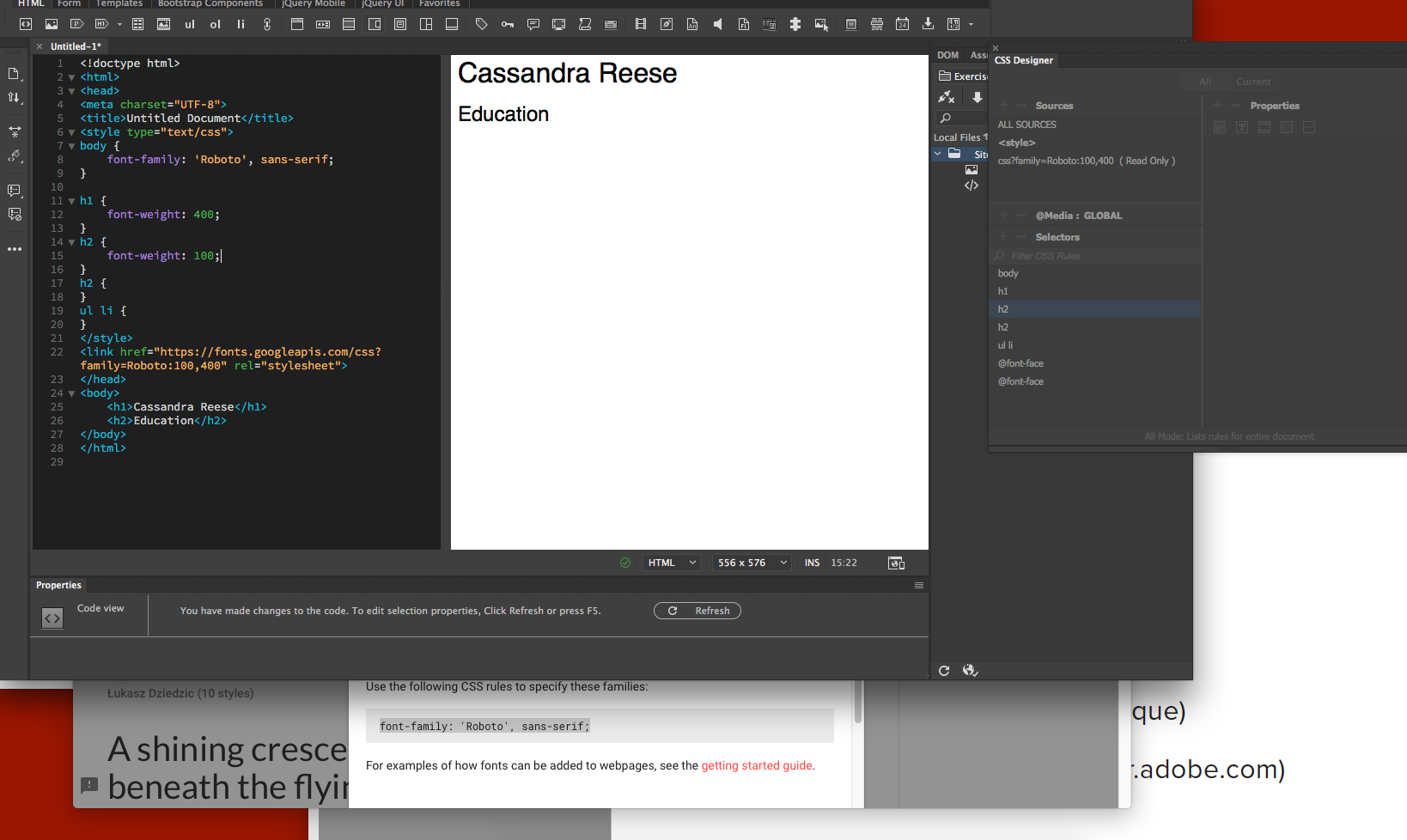
In Dreamweaver, this week includes how to setup Webfonts. You are required to watch video 1. Video 2 is optional at this time. If you want to use Adobe Fonts instead, please watch this video.
How to insert Webfonts from Google Fonts in DW
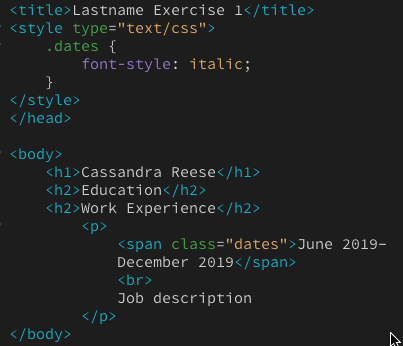
Using spans and classes to style specific content
13. Webfont Resources
- How to Add Google Fonts to Website | video
- Webfont Generator | Font Squirrel