Welcome to Web Design!
I’m thrilled to begin this journey with you as we delve into web design! With class opening on Tuesday, your first review is pre-recorded to allow flexibility. Our first live will be on Monday, January 28th @noon.
📌 Weekly Structure (applies every week)
- Content Release: Mondays @ 11 AM(Tues @ 11 AM if holiday week). Week 1 opens on Tuesday, January 20th due to no class at our university
- Deadlines: All assignments due Mon @ noon (or Tue when no Monday class)
- ZOOM : Optional. Monday review + critique (recorded). If no Monday class → prerecorded review + Wed @ noon live session.
- Critiques:
- Regular weeks: Mon @ noon → Wed @ noon
- No Monday class: Tue @ noon → Thu @ noon
- Use discussion board if not in ZOOM
- Remote Office Hours: Wednesdays, 11AM–1PM → Schedule Here
Week 1+2 Links & Notes
(specific to this week)
- 📹 Watch First: Course Introduction (pre-recorded) → 4.5m
- 📹 Watch Now: Week 1 Intro (pre-recorded) → [Watch Here] 50m
- 📹 Watch Now: Syllabus Review (pre-recorded) → [Watch Here] 27m
Live Sessions Next Week:
👉 Join Live: Mon 1.26 @ NOON (week 2 review)→ 🎥 [Join Here]
Will be recorded for those unable to attend live.
This week’s deadlines:
Monday, Jan. 26th @ noon
- Watch the above recordings (course introduction, weekly review, syllabus review).
- Complete Survey + Syllabus Agreement
- Purchase Required Textbook: HTML & CSS by Jon Duckett
- Create a free Medium account (Get Started) and a new Medium Story.
- Submit your Medium link (copy/paste URL) into the survey + syllabus agreement form above.
- Review content for Exercise #1 and Blog #1
- Install and open Dreamweaver before next week
- Join Discord and Complete your first introduction (ungraded)
Next week, we will continue learning HTML, begin learning Dreamweaver, continue Exercise 1, and complete additional warmups.
Weekly Content
Welcome to Web Design!
Week 1 (though not required, it is recommended you move through in sequence. All items need to be completed by next Monday @noon):
- Course Introduction (Weekly Recording – above)
- Review Syllabus (Weekly Recording – above)
- Complete Survey + Syllabus Agreement
- Purchase Required Textbook: HTML & CSS by Jon Duckett
- Due Mon.: Working Groups – connect with peers
- Join Discord and Complete your introduction.
SECTION I – Course + HTML Intro
- Join Discord and Complete your introduction.
- Lecture: Intro to Web Design (video below)
- Review Intro to Web Design Resources
- Lecture: Intro to HTML (video below)
- Review Intro to HTML Resources
- Read Chapters 1–3 (structure, text, lists) in Duckett’s HTML & CSS (reading deadline end of week 2)
- Watch: Evolution of Web Design | 8m
SECTION II – Blog 1 + Exercise 1
(Assignments – Warmups, Blogs, Exercises, and Projects) - Due Mon.: Create your free Medium account (click “Get Started”) and post your Medium link to the syllabus agreement form.
- Begin Blog #1 on D2L > Discussions > Blog 1 (due week 3)
- Begin Exercise – part 1: Looking ahead, review the content for exercise 1 (due week 3 with part 2)
SECTION III – Dreamweaver
(Software Demos + Tutorials) - Download and open DW on Adobe CC for next week
5. Working Groups
🌟 Welcome to our Course Discord! 🌟 First up, make sure to join our course’s Discord community by following this link: Join Discord.
Discord will serve as our informal studio space this term,… a place to share work-in-progress, ask questions, get feedback, and connect with classmates in a low-pressure way. This is not a replacement for assignments, blogs, or critiques. Think of it as the hallway conversations and studio check-ins we’d have if we were all in the same room.
What Are Working Groups?
You’ll be placed into a small working group for peer interaction and feedback:
#team1: Savannah Almeida, Ashlyn Lucas, Callie Johnson, Jenna Schneider
#team2: Brock Anderson, Matt McDonnell, Audric Pastor, Nia Blanco
#team3: Emily Gasher, Noah Halsted, Aniya Mike, Andy Montejano
#team4: Nyx Bernoskim, Kayleigh Harper, Anna Raffaele
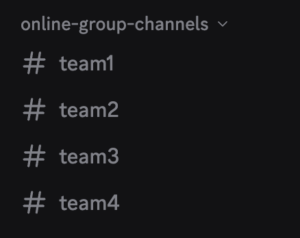
Week 1 Prompt: Introductions (ungraded)
Channel: #team1, #team2, #team3, or #team4
In your team channel, share your name, contact information, and a short description of your major, campus, and interests. One website you spend a lot of time on (any kind!). No minimum length. No pressure. Just show up.
Note: This post is not graded — it’s here to help us establish community before graded prompts begin next week.
Connect with your Teams:
- Connect: Initiate conversations with your team members. Consider setting up a text chat, meeting for coffee, or scheduling a Zoom call to discuss course material or just to get to know each other better.
- Participate: Jump into your team’s channel on Discord for a weekly prompt or to share other topics. Your insights are valuable and can greatly contribute to our learning community.
- Support: Share resources, provide feedback, and help your peers out. Together, we can make this learning experience richer for everyone.
Interaction Points on Discord
For the 5 graded prompts, beginning in week 2, you can earn a total of 2 points for your engagement in the Discord discussions, broken down into two parts. These must be posted before noon of the following week to earn credit.:
-
Posting (1 points): Contribute to the discussion by posting a response to the prompt in the designated channel. Your post should be thoughtful and add value to the discussion, reflecting your understanding or perspective on the topic.
-
Commenting (1 points): In addition to your post, engage with a classmate’s contribution by commenting on their post. Your comment should further the discussion, whether by asking a question, offering a new insight, or providing constructive feedback.
SECTION I – Course + HTML Intro
6. Intro to Web Design
In this section, you will find our first lectures and resources for our introduction to web design and HTML.
- Browsers | w3schools
- Jen’s Kitchen – Looking “under the hood”
- Try It – HTML Basic Document | w3schools
- History of Web Design Museum
- Web Design Inspiration
11. Watch: Evolution of Web Design | 8m
- P tag + spacing review | TryitEditor
- The poem problem | TryitEditor
- Self-Test – tags
- Self-Test – paragraphs
- Self-Test – headings
- Jen’s Kitchen – Looking “under the hood”
- Headings | TryitEditor
- HTML Basics | w3schools.com
- Tags, Elements, and Attributes | HTML Dog
- Amp What | HTML entity guide
- Character Guide
- List Items Tutorial | w3schools.com
- HTML5 CheatSheet | pdf
- Duckett’s Code Samples: Structure
SECTION II – B1 + E1
13. Blog 1: Learning to See Typographic Hierarchy
10 points – due monday 2.9@noon (end of week 3)
Peer commenting due: wednesday 2.11@noon
Where? D2L Discussion Board
Purpose: This first blog is a studio reflection, not a report. Before we write code or build layouts, designers need to recognize how hierarchy, structure, and typographic decisions guide attention and meaning. This assignment focuses on observation, vocabulary, and connecting design theory to real websites you already interact with.
-
- Part 1: Observing + Annotate – Visual Analysis (3 pts):
Find one website where typography clearly organizes information (news/editorial/cultural/corporate/content-heavy sites work best).
Include 1 screenshot (with source credit) and describe (1) What you notice first, second, and third. (2) How type size/weight/spacing/placement guides attention. (3) How hierarchy helps (or hinders) clarity and readability. -
Part 2: Vocabulary in Use (Naming What You See) (2 pts): Using course vocabulary (from videos, textbook readings, or class examples), describe how hierarchy is created. You might reference: Size and scale, Weight or contrast, Line length and spacing, Grouping or proximity, Alignment or rhythm. The goal here is not perfection, but practice: learning how to name design decisions rather than just reacting to them.
- Part 3: Connecting Structure to Meaning (Article Connection) (2 pts): After reading this UX Design article about the importance of semantic HTML, focus on one key takeaway or insight that resonated with you or influenced your thinking. In your own words: (1) How does semantic structure support clarity or hierarchy? (2) How might the website you chose benefit (or suffer) from strong or weak structure behind the scenes? You are not expected to understand all of the code yet … focus on conceptual connections, not technical details. Note: We are using this article because it connects semantic HTML… the meaning and structure of web content… to real user outcomes like accessibility and clarity, which directly supports your design thinking in this course.
- Part 4: Reflection & Application (2 pts): Reflect on how this exercise changed the way you look at websites. Consider: (1) Has this changed how you notice typography on the web? (2) Is there anything you now realize you’ve taken for granted? (3) What might you pay more attention to as you begin designing your own pages?
- Peer Engagement (1 pt). Share the blog on D2L Discussion > Blog 1. *Peer commenting is due within 48h after the blog is due (next Wednesday @noon). After submitting your blog, thoughtfully comment on two classmates’ posts. Focus on what you learned from their observations or how their example expanded your perspective.
- Part 1: Observing + Annotate – Visual Analysis (3 pts):
evaluation (10 Points Total)
Example Analysis (3 Points): Clear hierarchy analysis + screenshot w/source credit.
Vocabulary in Use (2 Points): Using course terms accurately (ex: scale, contrast, spacing, alignment, grouping)
Article Connection (2 Points): 1 takeaway + strong connection to structure/clarity/accessibilty
Personal Reflection (2 Points): Thoughtful reflection and how this will influence your design thinking.
Peer Commenting (1 Point): Engaging constructively with 2 peers' blogs within 48h.
All blogs must be a minimum of 250 words of your unique thought to receive credit, but may well exceed this minimum requirement. Include sources for any images or supporting information you reference from other locations. Blog entries are -2% for every 24 hours late. Incomplete blogs receive no credit.
14. Exercise 1 – HTML Menu
10/20pts | Part 1 of 3 | Foundations Exercise
Please review this week—you do not have to begin.
This exercise is about structure, not style. In Part 1, you will build a single-page HTML menu for a fictional restaurant using only HTML. Your goal is to organize content clearly and meaningfully using semantic tags so that the document makes sense even without visual styling. Think of this as building the skeleton of a webpage before any design decisions are applied.
How This Exercise Works
This assignment unfolds across three connected parts over multiple weeks:
- Part 1: HTML Menu — Structure & Semantics
- Part 2: CSS Menu — Hierarchy, Typography & Behavior
-
Parts 1 and 2 are graded together as a single exercise after Part 2 is complete.
-
- Part 3: Webflow Translation — Visual Build & Responsiveness
- Part 3 is graded separately once we move into Webflow.
Requirements
1. Restaurant Content
Use the provided menu content file:
Restaurant_Menu_Content.txt
- Choose a restaurant name.
- You may customize menu item names only if the overall structure and length remain intact.
- The focus is organization, not creativity yet.
2. HTML Structure & Semantics
Using the provided content, structure your menu using:
- Headings:
Use h1 for the restaurant name
Use h2 / h3 for menu sections like starters, mains, desserts, drinks, etc. - Paragraphs:
Use p tags for descriptions - Lists:
Use ul or ol for menu items, sides, or grouped content - Sections:
Organize your menu into logical sections using section tags - Link:
Include one external link related to your restaurant (real or fictional)
Example: a supplier page, farm, food blog, or culinary resource
Ask yourself:
Does this hierarchy make sense if all styling is removed?
Could someone understand the menu just by reading the HTML?
What Not To Worry About Yet
❌ CSS
❌ Fonts
❌ Visual design
❌ Layout aesthetics
Those come later. This part is about meaning and order.
File Naming + Storage
- Filename:
lastname_exercise1.html - Storage: Store it in a folder labeled Exercise 1 in your course folder
evaluation (10 points)
Parts 1 and 2 will be evaluated together after the CSS portion (Part 2) is complete.
- 1 point – correct filename (
lastname_exercise1.html) - 2 points – content completeness: all menu sections are included and well-structured
- 6 points – HTML structure & semantics: correct syntax, varied tags, meaningful organization
- 1 point – correct inclusion of one external hyperlink